ermahgerd includes organization-scoped object storage derived from Barbara’s workerd-native storage engine. It offers two interfaces over the same objects:
- an S3-compatible endpoint for AWS CLI, boto3, SDKs, backups, and direct administration;
- R2-style Worker bindings declared in Wrangler configuration.
Create a bucket
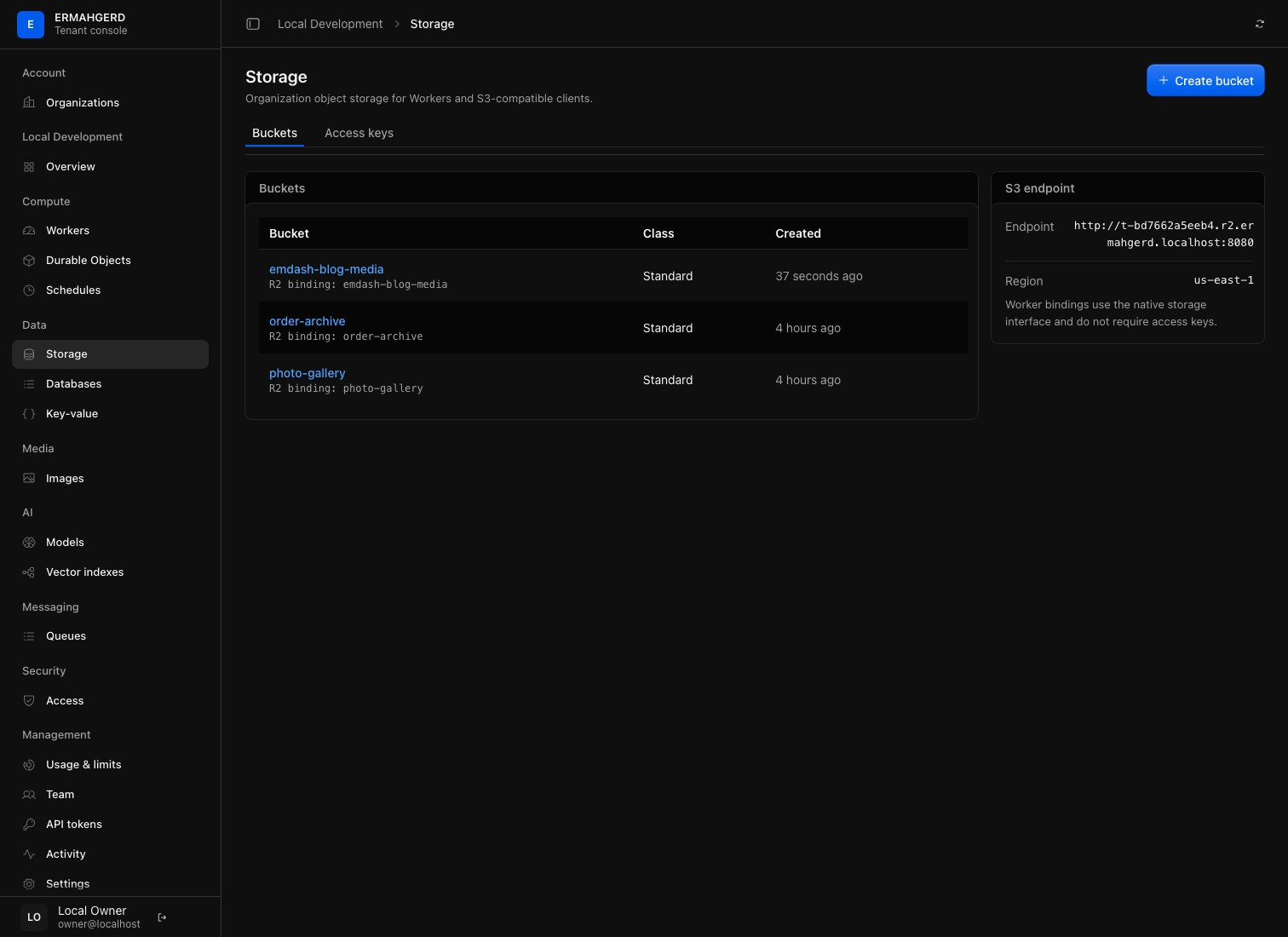
Open Storage in the organization section of the console and create a bucket. A read/write organization token may also use Wrangler’s R2 bucket API against the appliance API base URL.
Bucket metadata is isolated in an organization-specific Durable Object namespace. Object paths are random internal identifiers; another organization cannot address a bucket through the management API, an S3 credential, or a Worker binding.
Browse and manage a bucket
Select a bucket in the organization Storage page to open its object browser.
The browser treats /-delimited keys as virtual folders, provides prefix
breadcrumbs, and keeps the active prefix, filter, page, and current-versus-
versions view in the URL. An object detail page shows its size, content type,
last-modified time, ETag, version ID, and custom metadata. Read/write members
can upload, copy, download, and delete objects; observers can browse and
download them.
Bucket settings expose Barbara’s full safety model:
- versioning can be enabled to retain immutable object versions and delete markers;
- current objects, older versions, delete markers, unfinished multipart uploads, and retained bytes are counted separately;
- an exact version or delete marker can be downloaded or permanently removed;
- emptying requires the bucket name and a freshly reviewed contents revision, so a concurrent write invalidates the confirmation;
- deleting a bucket remains disabled until every current object, retained version, delete marker, and unfinished upload has been removed.
Browser uploads currently share the control API’s 128 MiB request limit. Use the S3 endpoint and multipart uploads for larger objects or resumable transfer.
Bind a bucket to a Worker
Declare the binding exactly where a Cloudflare Worker project normally does:
{
  "r2_buckets": [
    {"binding": "MEDIA", "bucket_name": "media-assets"}
  ]
}
Deploy with Wrangler. The control plane verifies that the bucket exists in the
same organization before accepting the version. At invocation time, the
trusted runtime dispatcher injects a bucket-scoped capability as env.MEDIA.
It does not inject an S3 key or the storage service token.
The current adapter implements the common get, head, put, delete, and
list operations, including streaming reads and byte ranges. Multipart R2
binding methods and the full Cloudflare R2 conditional/metadata surface are
not yet implemented. The external S3 interface retains Barbara’s broader
multipart, versioning, checksum, and range support.
Run the included round-trip example on a provisioned appliance:
make storage-checkThe example in examples/r2-media/ writes through env.MEDIA, then streams
the stored object back. The same pattern can serve audio, video, downloads, or
static site assets without buffering reads in Worker code.
Use the S3 endpoint
Create an S3 access key from the Storage page. The secret is displayed only once. Each key is read-only or read/write and may be restricted to named buckets.
The endpoint is unique to the organization:
http://<organization-namespace>.r2.ermahgerd.localhost:8080For the bootstrap organization:
AWS_ACCESS_KEY_ID=ER2... \
AWS_SECRET_ACCESS_KEY=... \
AWS_DEFAULT_REGION=us-east-1 \
aws --endpoint-url http://t-bd7662a5eeb4.r2.ermahgerd.localhost:8080 \
  s3 ls
Requests use AWS Signature Version 4. The signed host must match the credential’s organization namespace. Revoking a key takes effect on its next request.
Persistence and limits
The dedicated ermahgerd-storage.service owns the writable blob directory and
SQLite Durable Object state under /var/lib/ermahgerd-storage/. Worker runtime
processes cannot access that directory. Storage is disposable with the Lima
VM; make destroy removes it, and make up provisions an immediately usable
empty service.
The Free tier includes 512 MiB of retained object data, Standard includes 2 GiB,
and Enterprise includes 8 GiB. The appliance is a
single-node development system: it does not replicate objects, provide remote
durability, or protect against loss of the data-01 disk.
Service levels and performance
The provisioned service-level dashboard shows independent read and write
availability, first-byte and finalization latency, error budgets, throughput,
pending operations, and disk pressure. Organization, bucket, and interface
filters narrow the view. See
storage service levels for exact
measurement boundaries, exclusions, candidate latency thresholds, and
make storage-benchmark usage.